Keep MacOS Updated Guide Tips
Keep MacOS Updated Guide Tips
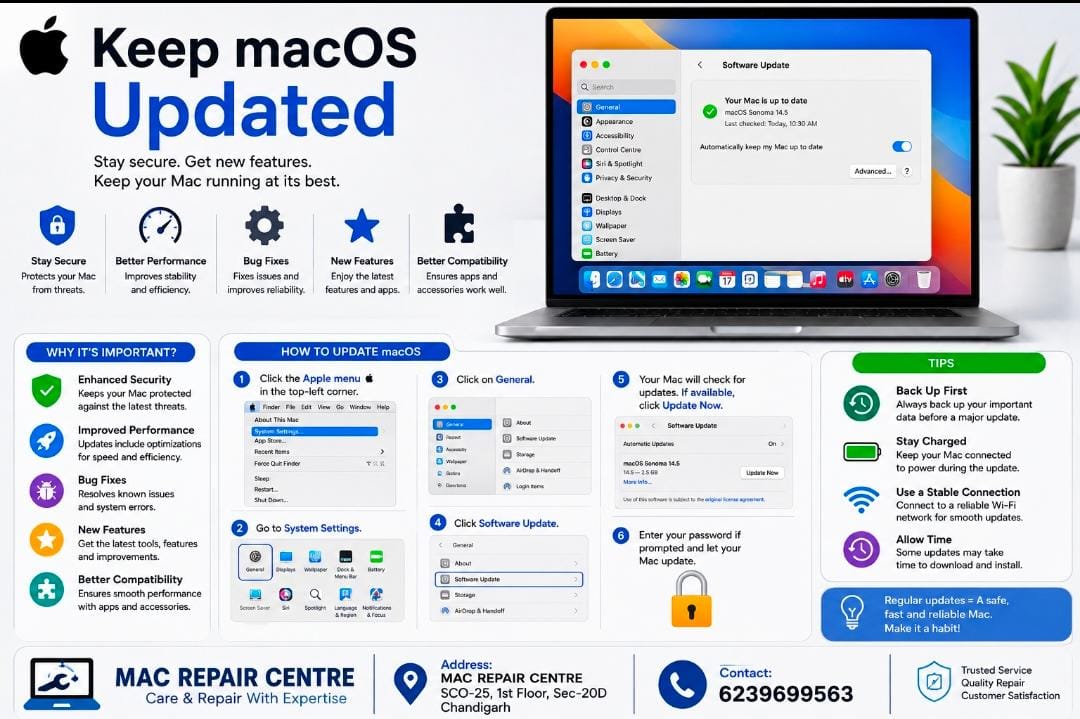
Keeping your MacBook’s macOS updated is important for security , performance , and stability . Apple regularly releases updates that fix security issues , improve system performance , and add useful features.
Why Should You Updated macOS ?
• Better Security= protects your Mac from new security threats.
• Improved Performance= helps your Mac run smoothly.
• Bug Fixes = resolves common software problems and errors.
• New features= gives you access to the latest macOS features.
• Better Compatibility= helps apps and accessories work properly .
How To Update macOS
Go to Apple Menu > System Settings > General >Software Update and check for available updates.
Tip = Always back up important data before installing a major macOS update.